Key Takeaways
- A contact center analytics dashboard improves decision-making by merging performance data with customer conversation insights.
- Effective dashboards go beyond just showing call volume; they reveal reasons behind customer calls and trends in agent performance.
- Key metrics for dashboards include call volume by reason, customer intent trends, QA scores, and escalation trends.
- AgentAssist.com enhances analytics dashboards by integrating conversation analytics, coaching needs, and case management.
- A well-designed dashboard helps managers identify issues, prioritize actions, and improve customer experience effectively.
Estimated reading time: 14 minutes
Table of contents
- What Is a Contact Center Analytics Dashboard?
- Why Contact Center Dashboards Matter
- The Dashboard Mistake Many Contact Centers Make
- Metric 1: Call Volume by Reason
- Metric 2: Customer Intent Trends
- Metric 3: QA Score Trends
- Metric 4: Agent Performance by Call Type
- Metric 5: Escalation and Case Trends
- Metric 6: Repeat Call Drivers
- Metric 7: Coaching Activity and Outcomes
- Metric 8: Call Summary and Documentation Quality
- Metric 9: Compliance-Sensitive Conversation Trends
- Metric 10: Customer Experience Friction Points
- How to Build a Better Contact Center Dashboard
- What Contact Center Managers Should Avoid
- How AgentAssist.com Helps Contact Centers Build Better Analytics Dashboards
- Final Thoughts
- Key Takeaways
- Ready to turn contact center data into better decisions?
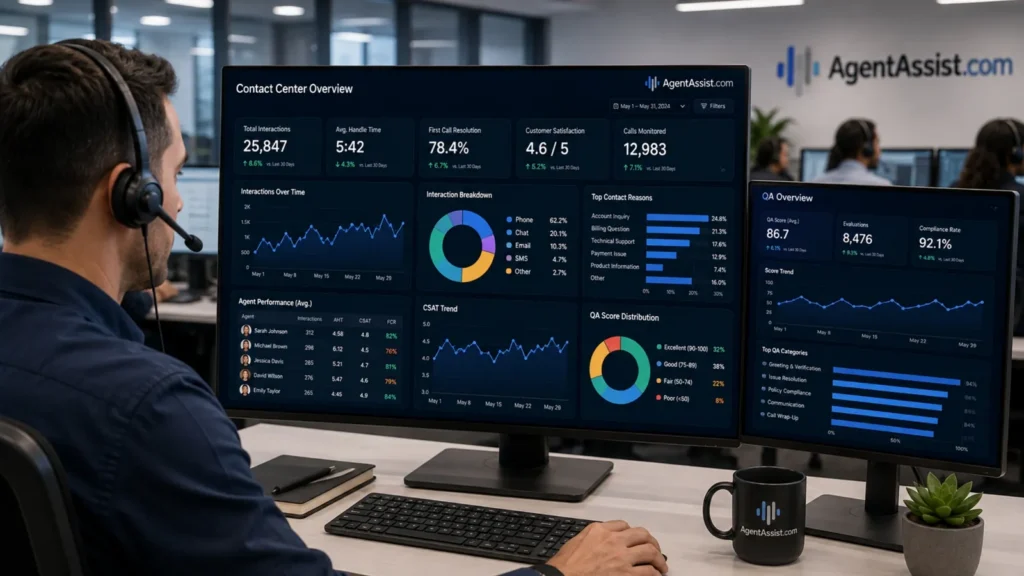
A contact center analytics dashboard helps managers see what is happening across customer conversations, agent performance, QA activity, escalations, call reasons, and operational workflows. Instead of relying on scattered reports, manual spreadsheets, or disconnected call notes, dashboards give leaders a clearer way to monitor performance and make decisions.
The most useful dashboards do more than show call volume. They help managers understand why customers are contacting the business, which issues are increasing, which agents may need coaching, which conversations need review, and where customer experience may be breaking down.
That distinction matters. A contact center can have good call volume reporting and still miss the deeper story. Managers may know how many calls came in, but not why customers called. They may know average handle time, but not which call types are driving longer conversations. They may know QA scores, but not which topics are causing quality gaps.
AgentAssist.com supports this type of workflow through Analytics, Conversation Analytics, Call Classification, Automated QA, Case Management, Agent Coaching, Call Summarization, Real-Time Assist, and related contact center AI tools. Its Analytics platform supports native reporting, customizable analytics, dashboards, reports, data visualization, APIs, alerts, notifications, and permissions.
What Is a Contact Center Analytics Dashboard?
A contact center analytics dashboard is a visual reporting tool that helps managers track important performance and conversation data in one place. It may include call volume, customer intent trends, QA scores, agent performance, call classifications, escalations, case activity, call summaries, and other operational insights.
A basic dashboard may show how many calls were answered, how long customers waited, and how long calls lasted. A stronger dashboard helps explain what those numbers mean.
For example, an increase in average handle time may not be a staffing problem. It may be caused by a new billing process, a confusing customer email, a repeated service issue, or a group of agents handling more complex call types.
A good dashboard helps managers move from “what happened?” to “why is it happening?” and “what should we do next?”
Why Contact Center Dashboards Matter
Contact centers create large amounts of data every day. Calls, chats, transcripts, QA reviews, summaries, coaching notes, case records, and reports all contain useful information. The challenge is turning that information into something managers can use quickly.
Without dashboards, leaders may depend on fragmented reporting. QA may have one report. Operations may have another. Supervisors may track coaching in a separate place. Compliance teams may have their own review workflow. Customer experience teams may only see complaints after they escalate.
This creates silos. Each team may see part of the picture, but not the full operating system.
A contact center analytics dashboard helps bring those pieces together. It gives leaders a clearer view of customer demand, agent performance, quality trends, risk-sensitive conversations, and workflow issues.
The Dashboard Mistake Many Contact Centers Make
Many contact center dashboards are too focused on activity. They show how many calls happened, how long they lasted, and whether service levels were met. Those metrics are useful, but they are not enough.
Activity metrics tell managers how busy the contact center is. They do not always explain what customers need.
A dashboard that only shows activity may lead to shallow decisions. If call volume increases, leaders may assume they need more agents. If handle time increases, they may pressure agents to move faster. If QA scores drop, they may assume agents need more training.
Sometimes those conclusions are right. But sometimes they miss the real issue.
The better question is: what is driving the metric?
If call volume increases because customers are confused by a policy change, the answer may be clearer communication. If handle time increased because agents are handling more complex verification calls, the answer may be better workflow guidance. If QA scores dropped because scorecards are not aligned with current processes, the answer may be QA calibration.
Dashboards should help managers diagnose, not just count.
Metric 1: Call Volume by Reason
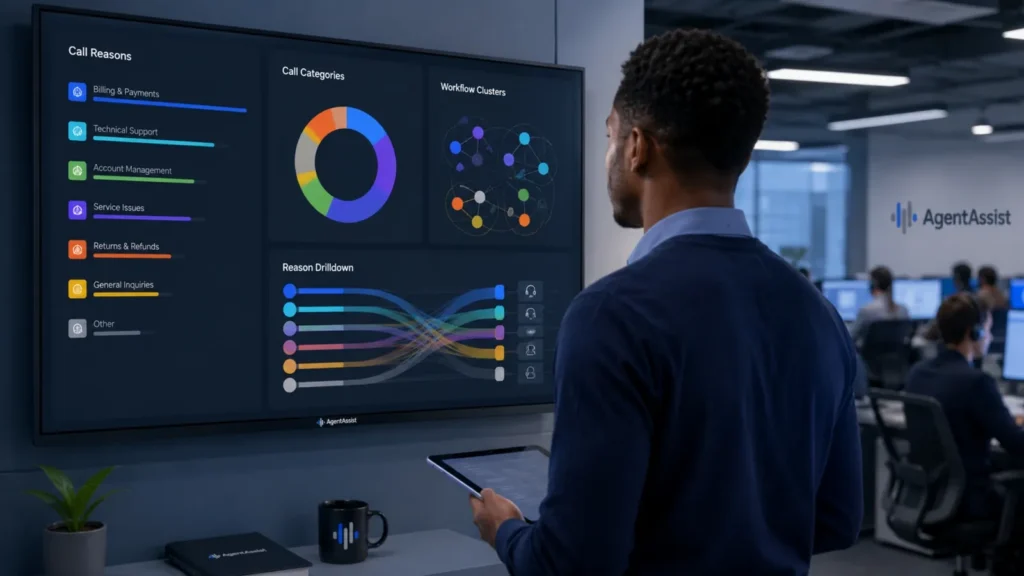
Call volume is useful, but call volume by reason is much more useful.
A manager does not only need to know that call volume has increased. They need to know whether customers are calling about billing questions, account updates, document requests, technical support, cancellation concerns, complaints, payment issues, or service problems.
AgentAssist.com Call Classification solution helps businesses understand why customers are contacting them, create customizable intent structures, listen to calls by classification, and track intent trends. This makes call reason reporting a stronger dashboard category.
A call volume by reason dashboard can help managers see which customer issues are growing, which workflows are creating repeat contact, and which areas may need operational attention.
Metric 2: Customer Intent Trends
Customer intent trends show what customers are trying to accomplish over time. This is slightly different from call reason reporting.
A call reason may be “billing.” The customer intent may be “understand a duplicate charge,” “request a refund,” “set up payment,” or “clarify invoice language.” The more specific the intent, the more useful the insight.
Customer intent trends can help managers see whether customer needs are changing. For example, a rise in account verification calls may point to a process issue. A rise in cancellation-related calls may suggest customer friction. A rise in document request calls may show that instructions are unclear.
A dashboard should make those patterns visible before they become larger problems.
Metric 3: QA Score Trends
QA score trends help managers understand whether quality is improving, declining, or staying consistent across teams and call types.
But QA scores should not be viewed in isolation. A low score may reflect agent performance, but it may also reflect a confusing process, unclear expectations, inconsistent scorecards, or difficult call categories.
AgentAssist.com Automated QA platform supports customized automated scorecards, scoring rationale, automated scoring and reporting, and quality monitoring workflows. When QA data is included in dashboards, managers can review quality trends alongside call reasons, agent groups, case activity, and coaching needs.
This helps leadership ask better questions, such as whether QA gaps are concentrated in certain call types or spread across the whole operation.
Metric 4: Agent Performance by Call Type
An agent performance dashboard becomes more useful when performance is connected to call type.
One agent may appear to have longer calls than another, but that may be because they handle more complex conversations. Another agent may have lower QA scores, but the issue may be tied to one specific workflow. A team may struggle with cancellation calls but perform well on routine account updates.
Managers should look at agent performance through context.
A useful dashboard may compare agent performance by:
- Call classification
- Customer intent
- QA score category
- Escalation frequency
- Coaching activity
- Repeat issue patterns
- Case review outcomes
This helps supervisors avoid one-size-fits-all coaching. Instead, coaching can be targeted to the specific call types and workflows where agents need support.
Metric 5: Escalation and Case Trends
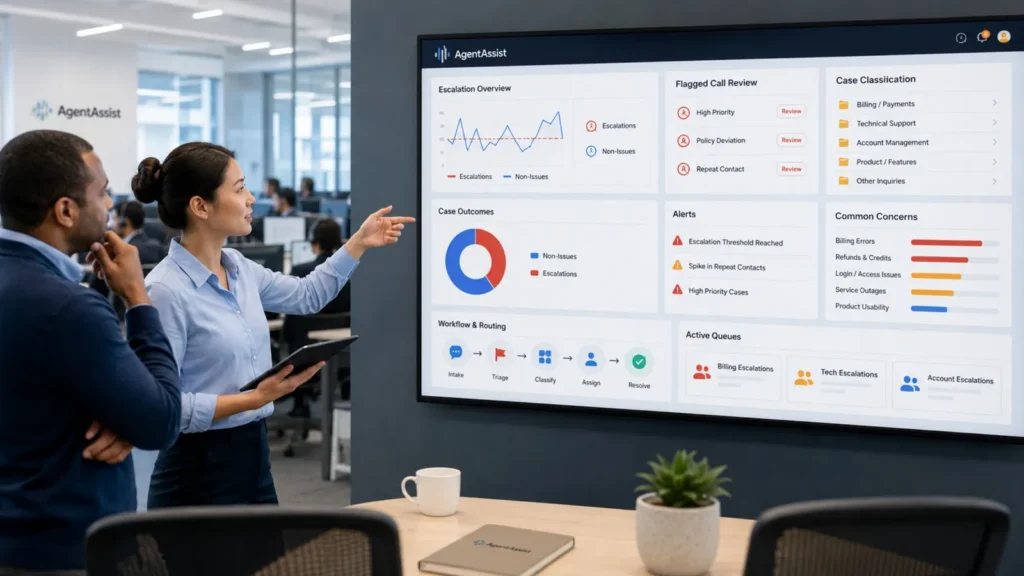
Escalation and case trends show which conversations are being flagged for review and what happens after review.
A contact center may want to track complaints, supervisor requests, service failures, compliance-sensitive topics, fraud-risk conversations, or repeated unresolved issues. These are not just customer service issues. They can reveal risk, process gaps, and customer experience problems.
AgentAssist.com Case Management solution supports customized case generation, flagged call review, notes, alerts, notifications, classification, escalation, and customized reports. This makes case trends a natural dashboard category.
A strong case dashboard can help managers see whether cases are increasing, which topics are driving them, how many are non-issues, which ones require escalation, and whether certain workflows are creating repeated concerns.
Metric 6: Repeat Call Drivers
Repeat calls often signal unresolved issues or customer friction. A customer may call again because they did not receive a clear answer, the process did not work, documentation was missing, or the original issue required follow-up.
A dashboard should help managers identify the categories most likely to create repeat calls.
For example, repeat calls may be tied to:
- Billing confusion
- Account access problems
- Missing documents
- Failed self-service attempts
- Unclear instructions
- Service follow-ups
- Escalation requests
- Policy questions
This information can help managers decide whether to update training, improve customer communication, refine self-service content, or adjust workflows.
Metric 7: Coaching Activity and Outcomes
Coaching dashboards help supervisors see whether performance feedback is actually being delivered and followed up on.
A dashboard may show coaching tasks, assigned topics, completion status, recurring coaching themes, agent improvement areas, and links between coaching and QA results.
AgentAssist.com Agent Coaching platform supports tasks, notes, timestamps, alerts, reporting, and coaching workflows. When coaching activity is connected to analytics, supervisors can move from informal feedback to a more structured improvement process.
The goal is not just to create coaching tasks. The goal is to see whether coaching is connected to the real issues appearing in customer conversations.
Metric 8: Call Summary and Documentation Quality
Call summarization can support dashboard visibility by making customer interactions easier to review and understand.
When summaries are clear, supervisors and managers can more quickly understand what happened in a conversation, what the customer needed, what action was taken, and whether follow-up was required.
AgentAssist.com Call Summarization platform supports concise summaries of customer conversations and can help reduce time spent on manual after-call notes.
A dashboard does not need to show every summary in full. But it can help track whether summaries, follow-up context, and documentation workflows are supporting the broader operation.
This matters because poor documentation can create repeat calls, weak handoffs, and incomplete case review.
Metric 9: Compliance-Sensitive Conversation Trends
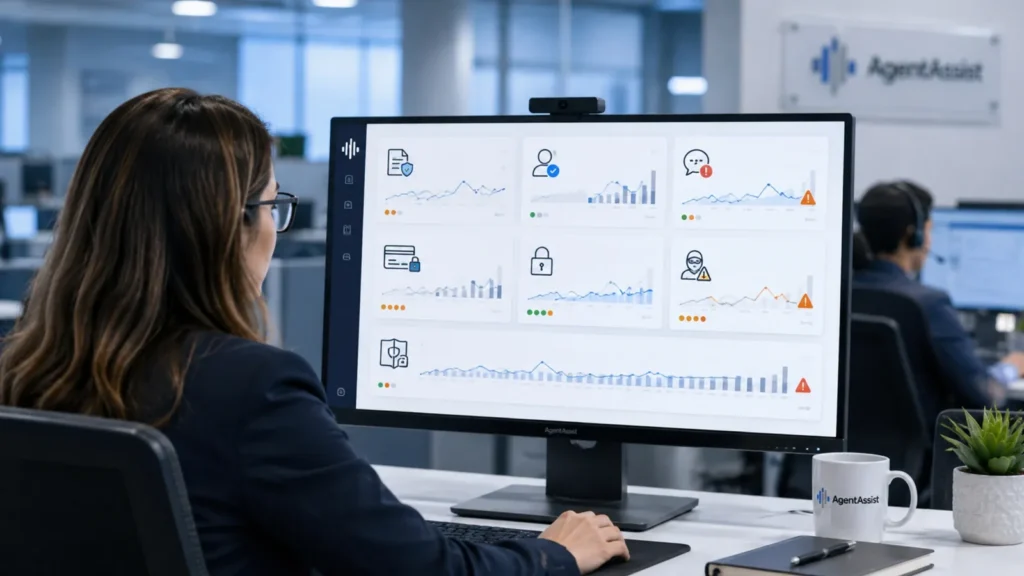
Compliance-sensitive conversation trends help managers see which calls may need special review. These may include required disclosure topics, complaint handling, account verification, payment-related conversations, sensitive information, fraud-risk topics, or policy-related language.
A dashboard can help identify and review compliance-sensitive conversations, but it should not be treated as guaranteeing compliance.
AgentAssist.com Automated QA, Case Management, and Conversation Analytics tools can support compliance-risk review by helping teams apply scorecards, flag selected conversations, search and filter calls, add notes, and generate reports.
This type of dashboard can help QA and compliance teams focus review efforts on conversations that may carry higher risk.
Metric 10: Customer Experience Friction Points
A strong contact center analytics dashboard should help leaders find friction points in the customer journey.
Customer friction may appear as high repeat call volume, more escalation requests, longer calls, complaint language, unresolved follow-ups, or repeated questions about the same process.
The dashboard should help managers see whether the problem is happening in one area or across the operation.
For example, customer experience friction may be tied to:
- A confusing policy
- A broken self-service path
- A billing communication
- A product issue
- A service delay
- A weak handoff between departments
- Incomplete documentation
- Inconsistent agent guidance
This is where analytics becomes strategic. The dashboard is no longer just a contact center report. It becomes a map of where the customer journey needs improvement.
How to Build a Better Contact Center Dashboard
The best contact center dashboards are built around decisions, not decoration.
Before adding metrics, managers should ask what decisions the dashboard needs to support. A supervisor dashboard may need agent performance, coaching tasks, QA trends, and flagged calls. An operations dashboard may need call reasons, repeat call drivers, workflow issues, and staffing pressure. A compliance dashboard may need required language review, case activity, sensitive topics, and QA scorecards. An executive dashboard may need high-level trends, customer friction points, efficiency opportunities, and risk indicators.
This is why one dashboard is rarely enough. Different roles need different views.
A good dashboard should be:
- Clear enough to understand quickly
- Specific enough to support decisions
- Connected to actual customer conversations
- Updated with useful reporting data
- Organized around workflows, not vanity metrics
- Connected to QA, coaching, case management, and analytics
- Flexible enough to evolve as the business changes
AgentAssist.com Analytics platform supports customizable analytics and reporting, including customizable dashboards, reports, data visualization, APIs, alerts, notifications, security permissions, and redaction. That flexibility matters because every contact center has different reporting needs.
What Contact Center Managers Should Avoid
Managers should avoid dashboards that look impressive but do not lead to action.
A dashboard with too many charts can create confusion. A dashboard with only high-level numbers can hide the real issues. A dashboard that is not connected to conversation data may show performance but not explain customer behavior.
The most common mistake is tracking metrics because they are available, not because they support decisions.
A better approach is to start with a small set of important questions:
- Why are customers contacting us?
- Which issues are increasing?
- Which calls need review?
- Where do agents need support?
- Which workflows create repeat contact?
- Which conversations may carry risk?
- What should managers do next?
If the dashboard helps answer those questions, it is useful. If it only creates more reporting noise, it needs refinement.
How AgentAssist.com Helps Contact Centers Build Better Analytics Dashboards

AgentAssist.com helps contact centers build more useful analytics dashboards by connecting reporting to real customer conversations.
Its Analytics platform supports native reporting, customizable analytics, standard reports, customizable dashboards, embedded data visualization, APIs, alerts, notifications, security permissions, and redaction. Its Conversation Analytics platform helps teams search, filter, review, extract insights, create saved searches, and generate reports. Call Classification helps identify why customers are contacting the business and track intent trends.
When these capabilities connect with Automated QA, Case Management, Agent Coaching, Call Summarization, and Real-Time Assist, contact center dashboards become more practical. Managers can move from seeing numbers to understanding what those numbers mean.
That is the real value of a dashboard: better visibility, better prioritization, and better decisions.
Final Thoughts
A contact center analytics dashboard should help managers understand performance, customer needs, quality trends, case activity, coaching opportunities, and operational friction. It should not only report what happened. It should help explain why it happened and what the team should review next.
Traditional metrics like call volume and handle time still matter. But modern contact centers need more context. They need to connect those metrics with call classification, conversation analytics, automated QA, case management, agent coaching, call summarization, and reporting.
AgentAssist.com helps contact centers create dashboards and analytics workflows that turn customer conversations into practical business insight. With the right dashboard strategy, managers can stop chasing scattered reports and start making clearer, faster, more informed decisions.
Key Takeaways
- A contact center analytics dashboard helps managers track performance, customer conversation trends, QA activity, coaching needs, escalations, and operational issues.
- The best dashboards combine traditional contact center metrics with conversation intelligence, call classification, QA results, case trends, and agent coaching data.
- Managers should avoid dashboards that only show activity. A better dashboard helps explain what needs attention and why.
- AgentAssist.com helps contact centers connect analytics with Conversation Analytics, Call Classification, Automated QA, Case Management, Agent Coaching, Call Summarization, Real-Time Assist, and reporting workflows.
A contact center analytics dashboard is a reporting tool that helps managers track customer conversations, call reasons, QA performance, agent activity, case trends, coaching needs, and operational metrics in one place.
A useful dashboard may include call volume by reason, customer intent trends, QA scores, agent performance by call type, escalation trends, repeat call drivers, coaching activity, compliance-sensitive conversation trends, and customer experience friction points.
Call reason data helps managers understand why customers are contacting the business. This makes dashboard reporting more useful than call volume alone.
Dashboards can help QA teams track score trends, review calls by category, identify repeated quality gaps, and connect findings to coaching workflows.
Dashboards can show which agents need support, which call types are creating difficulty, which coaching tasks are active, and whether coaching is connected to QA and performance trends.
AgentAssist.com supports contact center analytics dashboards through Analytics, Conversation Analytics, Call Classification, Automated QA, Case Management, Agent Coaching, Call Summarization, Real-Time Assist, reporting, alerts, notifications, permissions, and data visualization.
Ready to turn contact center data into better decisions?
See how AgentAssist.com helps contact centers build customizable analytics dashboards, track conversation trends, improve reporting, and turn customer interactions into actionable insights. Book a demo today.
Sources Used
- AgentAssist.com — Analytics
https://agentassist.com/platform/analytics/ - AgentAssist.com — Conversation Analytics
https://agentassist.com/platform/conversation-analytics/ - AgentAssist.com — Call Classification
https://agentassist.com/platform/call-classification/ - AgentAssist.com — Automated QA
https://agentassist.com/platform/automated-qa/ - AgentAssist.com — Case Management
https://agentassist.com/platform/case-management/ - AgentAssist.com — Agent Coaching
https://agentassist.com/platform/agent-coaching/ - AgentAssist.com — Call Summarization
https://agentassist.com/platform/call-summarization/ - AgentAssist.com — Real-Time Assist
https://agentassist.com/platform/real-time-assist/ - AgentAssist.com — Homepage
https://agentassist.com/ - Google Search Central — Creating Helpful, Reliable, People-First Content
https://developers.google.com/search/docs/fundamentals/creating-helpful-content