Key Takeaways
- Supervisor alerts in contact centers notify team leaders of customer conversations needing review based on specific criteria.
- They help close gaps by surfacing important calls for supervisors to review without overwhelming them with notifications.
- Effective alert criteria may include compliance-sensitive topics, repeat unresolved issues, and complaints.
- AgentAssist.com enhances the workflow by connecting supervisor alerts with case management, QA, and coaching.
- To avoid alert fatigue, contact centers should create specific, targeted alerts and regularly review their effectiveness.
Estimated reading time: 14 minutes
Table of contents
- What Are Supervisor Alerts in a Contact Center?
- Why Supervisors Need Better Alert Workflows
- What Types of Calls Should Trigger Supervisor Alerts?
- Supervisor Alerts vs. Agent Escalations
- How Supervisor Alerts Work With Case Management
- How to Avoid Alert Fatigue
- How Conversation Analytics Supports Supervisor Alerts
- How Call Classification Improves Alert Accuracy
- How Supervisor Alerts Support QA Teams
- How Supervisor Alerts Support Agent Coaching
- How Supervisor Alerts Support Real-Time and Post-Call Workflows
- How Reports Help Improve Supervisor Alerts
- What Contact Centers Should Avoid
- What to Look for in Supervisor Alert Software
- How AgentAssist.com Helps Contact Centers Use Supervisor Alerts
- Final Thoughts
- Key Takeaways
- FAQs
- Ready to know which calls need attention?
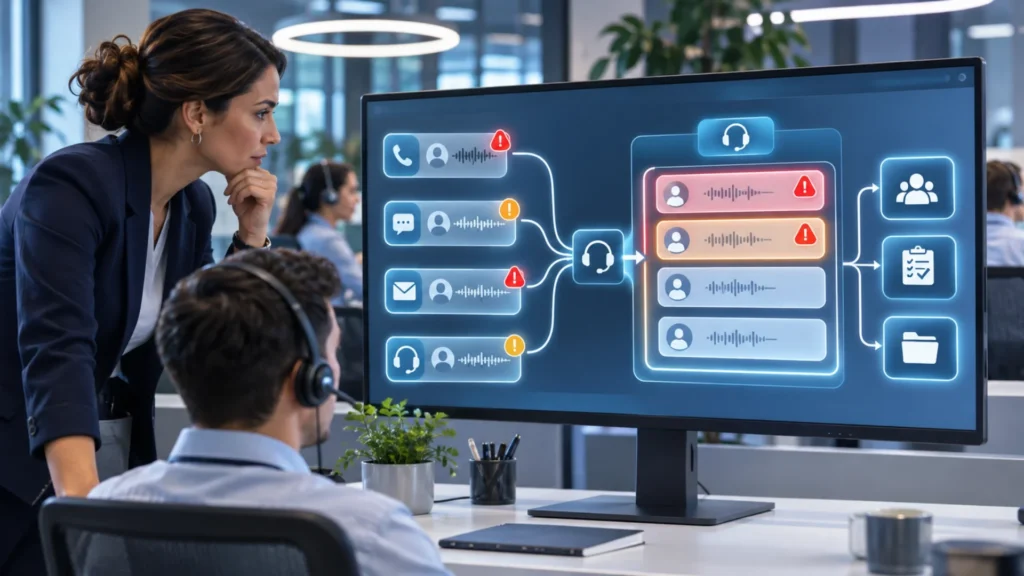
Supervisor alerts help contact centers identify customer conversations that may need faster review. These alerts can point supervisors toward calls involving escalations, complaints, service issues, compliance-sensitive topics, fraud-risk indicators, repeated unresolved problems, or other selected business criteria.
In a busy contact center, supervisors cannot listen to every call. They may depend on agents to raise their hand, QA teams to catch issues later, or customers to complain after the fact. That creates gaps. Important conversations can be missed, delayed, or buried inside broad call notes and disposition codes.
Supervisor alerts help close that gap by creating a more structured way to surface calls that need attention. The goal is not to create noise or overwhelm supervisors with too many notifications. The goal is to help the right people review the right conversations at the right time.
AgentAssist.com supports this workflow through Case Management, Conversation Analytics, Call Classification, Automated QA, Agent Coaching, Call Summarization, Real-Time Assist, and Analytics. Its Case Management solution helps teams receive alerts and notifications for customized cases, review flagged calls, add notes, classify non-issues, escalate concerns, and generate reports.
What Are Supervisor Alerts in a Contact Center?
Supervisor alerts are notifications that tell team leaders, supervisors, QA reviewers, compliance teams, or subject matter experts that a customer conversation may need review. The alert may be triggered when a call matches selected criteria defined by the business.
For example, a contact center may want alerts when a customer asks for a supervisor, mentions a complaint, discusses a fraud-risk concern, raises a compliance-sensitive topic, or describes a repeated unresolved issue.
A supervisor alert is not a final judgment. It does not automatically mean something went wrong. It simply means the call may need review.
That distinction matters because alerts should support human decision-making, not replace it.
A good alert says, “This call may deserve attention.”
The supervisor still decides what happened and what action should follow.
Why Supervisors Need Better Alert Workflows
Supervisors already have a demanding role. They support agents, monitor performance, handle escalations, review QA results, coach team members, and report to leadership. Without a clear alert workflow, they may spend too much time searching for important calls and not enough time acting on them.
The problem is not usually a lack of data. Most contact centers have call recordings, transcripts, notes, scorecards, dashboards, tickets, and reports. The problem is knowing which conversations matter most.
A supervisor alert workflow helps answer that question.
Instead of expecting supervisors to manually find every concern, the system can help surface calls that match selected criteria. From there, supervisors can review, classify, document, escalate, coach, or close the case as a non-issue.
This gives supervisors a more practical way to manage quality and risk-sensitive conversations.
What Types of Calls Should Trigger Supervisor Alerts?
The right alert criteria will depend on the business. A financial services contact center may care about payment issues, verification concerns, complaints, and fraud-risk conversations. A healthcare support team may focus on sensitive information, documentation, required procedures, and escalation language. A software support center may focus on service failures, high-friction tickets, repeat contacts, and unresolved technical issues.
Common supervisor alert triggers may include:
- Customer asks for a supervisor
- Customer mentions a formal complaint
- Customer says they already called about the same issue
- Customer describes a service failure
- Customer raises a billing dispute
- Customer discusses unauthorized activity
- Customer mentions identity or account access concerns
- Customer uses cancellation language
- Customer raises a compliance-sensitive topic
- Customer discusses sensitive personal information
- Agent misses a required workflow step
- Call is classified into a high-priority category
- Call becomes a customized case
These alert triggers should be treated as review signals. A call may be flagged and later marked as a non-issue. That is normal. The purpose of alerts is to help supervisors review important conversations faster.
Supervisor Alerts vs. Agent Escalations
Supervisor alerts and agent escalations are related, but they are not the same.
An agent escalation happens when the agent manually brings a call or issue to a supervisor. This is useful when the agent recognizes that help is needed.
A supervisor alert can support a broader workflow. It can surface conversations based on selected criteria, even if the agent did not manually escalate the call.
For example, a customer may mention that they have called three times about the same issue, but the agent may still resolve the immediate question and move on. A supervisor alert can help identify that the call may need review because it suggests a repeat unresolved issue.
This does not replace agent judgment. It adds another layer of visibility.
The best model uses both. Agents should still escalate live issues when needed. Supervisor alerts help identify important conversations that may otherwise be missed.
How Supervisor Alerts Work With Case Management
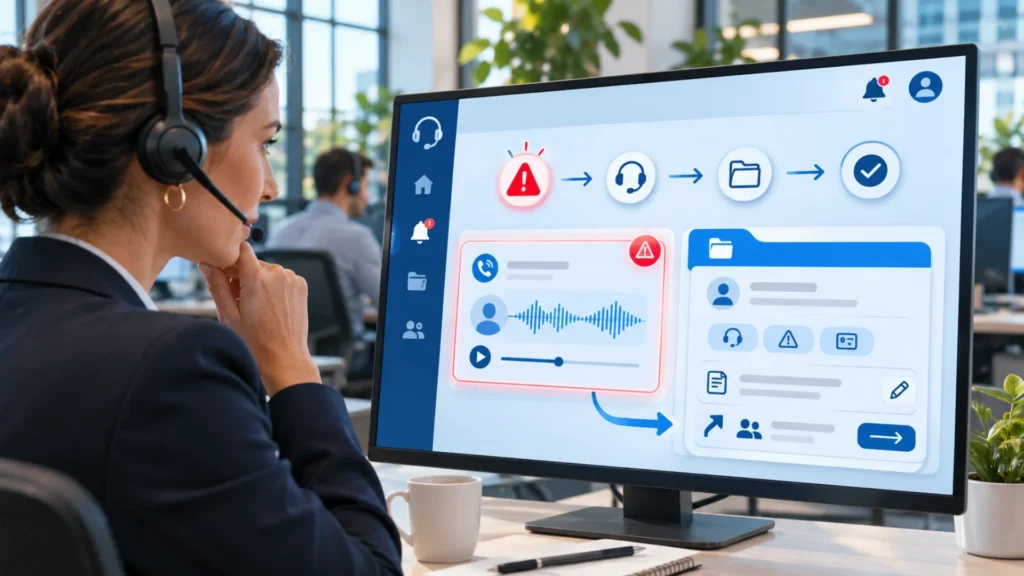
Supervisor alerts are most useful when they connect to case management.
An alert alone is not enough. A supervisor needs a place to review the call, add notes, classify the issue, escalate concerns, notify the right people, and track outcomes.
AgentAssist.com Case Management solution supports this type of workflow. It allows teams to receive alerts and notifications for customized cases related to compliance, service, fraud, risk, escalations, and more. It also supports customizable case generation, flagged call review, notes, alerts, notifications, and customized reports.
A practical case review workflow may look like this:
- A call matches selected alert criteria.
- The call is flagged and added to a case review workflow.
- The supervisor reviews the conversation.
- The supervisor classifies the call as a non-issue, coaching opportunity, escalation, compliance-risk concern, or follow-up item.
- Notes are added for context.
- Alerts or notifications are sent to key team members if needed.
- Reports help leaders track alert volume, outcomes, trends, and resolution activity.
This turns alerts into action.
How to Avoid Alert Fatigue
Supervisor alerts can become ineffective if there are too many of them. If every long call, every complaint keyword, or every broad category creates an alert, supervisors may stop paying attention.
This is called alert fatigue.
The solution is to make alert criteria specific and useful. A contact center should not create alerts just because it can. It should create alerts around conversations that truly need review.
For example, “billing” may be too broad. “Billing dispute with complaint language” may be more useful. “Long call” may be too broad. “Long call with unresolved issue language” may be more useful. “Negative sentiment” may be too vague. “Customer asks for supervisor” or “customer says this is the third call” is more concrete.
A stronger alert strategy avoids overclaiming emotional or tone detection and focuses on keywords, topics, call classifications, customer intent, metadata, and selected business criteria.
A strong alert strategy should be specific, measurable, and reviewed regularly.
How Conversation Analytics Supports Supervisor Alerts
Conversation analytics helps contact centers search, filter, and review customer interactions. This is important because alerts often begin with patterns found in conversations.
AgentAssist.com Conversation Analytics platform supports more than 20 filters, saved searches, call review, insight extraction, customized reports, and PII redaction.
This helps supervisors and managers understand alert patterns over time.
For example, conversation analytics can help answer:
- Which topics are creating the most alerts?
- Are supervisor requests increasing?
- Are repeated unresolved issues tied to one process?
- Are certain call classifications generating more case reviews?
- Are specific teams or queues seeing more flagged conversations?
- Are alerts resulting in real escalations or mostly non-issues?
These answers help leaders refine alert criteria.
If alerts are too noisy, criteria can be tightened. If important calls are still being missed, criteria can be expanded. Conversation analytics helps alert workflows improve over time.
How Call Classification Improves Alert Accuracy
Call classification helps contact centers organize conversations by reason, intent, topic, or issue type. This can make supervisor alerts more accurate because alerts can be tied to meaningful call categories.
AgentAssist.com Call Classification solution helps teams understand why customers are contacting them, create customizable intent structures, listen to calls by classification, and track intent trends.
Instead of creating alerts from broad keywords alone, contact centers can use call classification to provide context.
For example, the word “cancel” may appear in many conversations. Some may be routine. Others may involve customer dissatisfaction, unresolved issues, or escalation risk. Classification can help the contact center understand whether the call is a cancellation concern, retention conversation, billing dispute, or service issue.
Better classification can lead to better alert design.
How Supervisor Alerts Support QA Teams
QA teams benefit when alerts help them find calls worth reviewing.
Traditional QA often depends on sampling. Sampling can still be useful, but it may miss important conversations. Supervisor alerts add another layer by pointing QA teams toward calls that match selected criteria.
For example, QA teams may want to review calls involving required disclosures, complaint language, escalation requests, account verification, documentation gaps, or sensitive information handling.
AgentAssist.com Automated QA platform supports customized scorecards, scoring rationale, automated scoring, and reporting. When supervisor alerts connect with Automated QA, teams can review flagged calls with more structure.
This helps QA move from random review alone to more targeted quality monitoring.
How Supervisor Alerts Support Agent Coaching
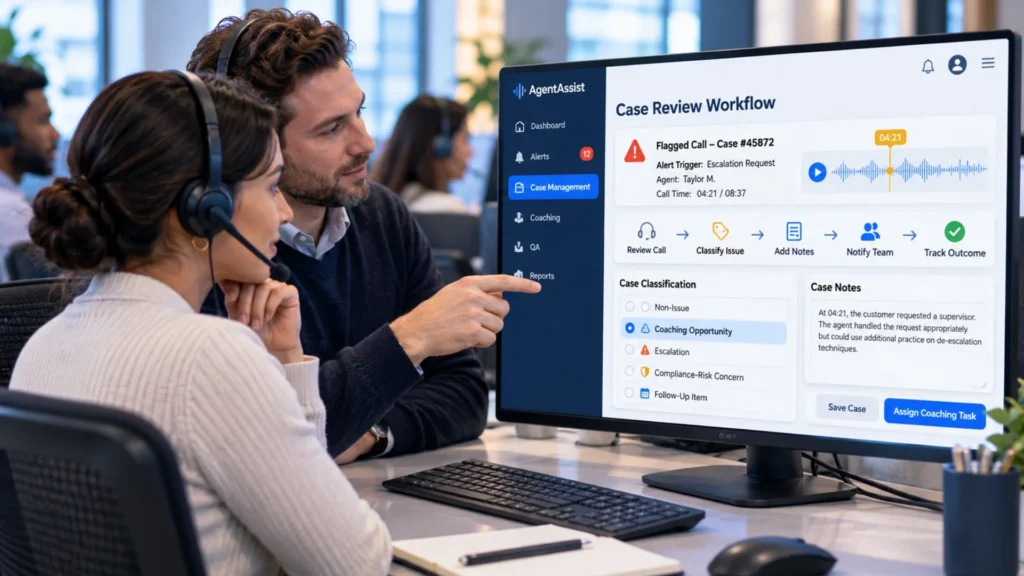
A supervisor alert may reveal a coaching opportunity. The agent may need help with escalation handling, policy explanation, documentation, call closing, verification steps, or follow-up communication.
But supervisors should be careful. A flagged call does not automatically mean the agent made a mistake. Sometimes the issue is caused by a confusing process, unclear customer instructions, a broken workflow, or a repeated service problem.
AgentAssist.com Agent Coaching platform supports coaching tasks, notes, timestamps, alerts, agent portals, accept/appeal workflows, and reporting.
This helps supervisors turn alerts into fair coaching.
For example, if an alert is triggered because a customer asked for a supervisor, the supervisor can review the call, determine whether coaching is needed, add a note at the relevant timestamp, assign a task, or mark the call as a non-issue.
That structure makes coaching more specific and less reactive.
How Supervisor Alerts Support Real-Time and Post-Call Workflows
Supervisor alerts can support both real-time and post-call workflows, depending on the contact center’s needs.
A real-time workflow may help supervisors respond quickly when a conversation is active or when an agent needs support. A post-call workflow may help QA, compliance, or operations teams review conversations after the interaction ends.
AgentAssist.com Real-Time Assist platform supports contextual real-time prompts and navigator checklist functionality for agents. AgentAssist.com Case Management platform supports flagged call review, alerts, notes, and escalation workflows.
The important point is that alerts should fit the workflow.
Some calls need immediate supervisor attention. Others need structured review after the call. Others need trend reporting, coaching, or process improvement.
A good alert system helps the contact center route each situation correctly.
How Reports Help Improve Supervisor Alerts
Supervisor alerts should be measured. If teams do not review alert performance, they will not know whether the alerts are useful.
AgentAssist.com Case Management and Analytics tools support customized reporting, dashboards, alerts, notifications, and data visualization. These reports can help leaders understand whether alerts are driving better review workflows.
Useful alert reporting may include:
- Number of alerts by category
- Alerts by team or queue
- Alerts closed as non-issues
- Alerts escalated for follow-up
- Alerts tied to coaching
- Alerts tied to compliance-sensitive review
- Alert trends over time
- Repeat call categories creating alerts
- Average time to review flagged calls
This helps leaders improve alert quality.
If most alerts are non-issues, the criteria may need refinement. If alerts are consistently creating valuable case reviews, the workflow is working. If certain categories keep increasing, leadership may need to investigate the root cause.
What Contact Centers Should Avoid
Supervisor alerts can create problems if they are poorly designed.
Contact centers should avoid:
- Alerting on broad keywords without context
- Sending every alert to too many people
- Creating alerts without a review workflow
- Treating flagged calls as confirmed problems
- Ignoring non-issue classifications
- Failing to update alert criteria
- Using vague emotional labels instead of concrete review criteria
- Not connecting alerts to QA or coaching
- Not reporting on alert outcomes
- Creating so many alerts that supervisors stop paying attention
A better approach is to start with a small set of high-value alert categories and refine over time.
What to Look for in Supervisor Alert Software
Contact center leaders should look for alert software that connects notifications to action. Alerts should not live in isolation. They should connect to case review, QA, coaching, analytics, and reporting.
Important capabilities include:
- Custom alert criteria
- Case management workflows
- Call classification support
- Conversation search and filters
- Saved searches
- Automated QA connection
- Notes and follow-up actions
- Alerts and notifications
- Escalation workflows
- Coaching task connection
- Custom reports and dashboards
- PII and sensitive data redaction
- Secure permissions
The strongest supervisor alert system helps teams identify the right calls, review them quickly, document what happened, and improve over time.
How AgentAssist.com Helps Contact Centers Use Supervisor Alerts

AgentAssist.com helps contact centers create supervisor alert workflows that connect conversation signals to action.
With Case Management, teams can create customized cases, receive alerts and notifications, review flagged calls, classify non-issues, escalate concerns, add notes, and generate reports. Conversation Analytics helps teams search, filter, review, and report on customer interactions. Call Classification helps teams understand why customers are contacting the business. Automated QA helps teams apply scorecards and quality monitoring workflows. Agent Coaching helps supervisors turn findings into tasks, notes, timestamps, and follow-up.
Together, these capabilities help supervisors focus on the calls that matter most.
Instead of relying only on manual escalation or random sampling, AgentAssist.com gives contact centers a more structured way to identify, review, and act on important conversations.
Final Thoughts
Supervisor alerts help contact centers know which calls need review. They can help identify conversations involving escalations, complaints, repeated unresolved issues, compliance-sensitive topics, fraud-risk indicators, service failures, and other selected criteria.
But alerts only work when they are connected to the right workflow. A notification by itself is not enough. Supervisors need a way to review the call, classify the outcome, add notes, escalate concerns, create coaching tasks, and report on trends.
AgentAssist.com helps contact centers connect supervisor alerts with Case Management, Conversation Analytics, Call Classification, Automated QA, Agent Coaching, Call Summarization, Real-Time Assist, and Analytics. That creates a more practical system for reviewing important conversations and turning them into better decisions.
Key Takeaways
- Supervisor alerts help contact centers identify calls that may need review.
- Useful alerts are based on selected criteria such as keywords, call classifications, metadata, case type, escalation language, or compliance-sensitive topics.
- Alerts should connect to a clear case review workflow, not just create more notifications.
- The best supervisor alert system helps reduce missed issues while avoiding alert fatigue.
- AgentAssist.com helps contact centers connect supervisor alerts with Case Management, Conversation Analytics, Call Classification, Automated QA, Agent Coaching, Call Summarization, Real-Time Assist, and Analytics.
FAQs
Supervisor alerts are notifications that tell supervisors, QA teams, compliance reviewers, or subject matter experts that a customer conversation may need review based on selected criteria.
Calls may trigger alerts when they involve supervisor requests, complaint language, repeated unresolved issues, compliance-sensitive topics, fraud-risk indicators, service failures, or selected call classifications.
No. A supervisor alert means the call may need review. After review, it may be classified as a non-issue, coaching opportunity, escalation, compliance-risk concern, or follow-up item.
Contact centers can avoid alert fatigue by using specific criteria, limiting unnecessary notifications, reviewing alert outcomes, refining rules over time, and connecting alerts to clear case workflows.
Supervisor alerts help QA teams find calls that may deserve targeted review, such as calls involving required procedures, complaints, escalation language, documentation issues, or compliance-sensitive topics.
AgentAssist.com supports supervisor alerts through Case Management, Conversation Analytics, Call Classification, Automated QA, Agent Coaching, Call Summarization, Real-Time Assist, Analytics, notes, notifications, and customized reports.
Ready to know which calls need attention?
See how AgentAssist.com helps contact centers create supervisor alerts, review flagged calls, manage cases, support QA, and turn important conversations into action. Book a demo today.
Sources Used
- AgentAssist.com — Case Management
https://agentassist.com/platform/case-management/ - AgentAssist.com — Conversation Analytics
https://agentassist.com/platform/conversation-analytics/ - AgentAssist.com — Call Classification
https://agentassist.com/platform/call-classification/ - AgentAssist.com — Automated QA
https://agentassist.com/platform/automated-qa/ - AgentAssist.com — Agent Coaching
https://agentassist.com/platform/agent-coaching/ - AgentAssist.com — Call Summarization
https://agentassist.com/platform/call-summarization/ - AgentAssist.com — Real-Time Assist
https://agentassist.com/platform/real-time-assist/ - AgentAssist.com — Analytics
https://agentassist.com/platform/analytics/ - AgentAssist.com — Homepage
https://agentassist.com/